Best Memory Cards for Photographers in 2026: SD, CFexpress, and What Actually Matters
As an Amazon Associate, ExifGrabber earns from qualifying purchases.
Why Your Memory Card Choice Matters
A memory card is one of the cheapest components in your camera bag, but it can also be the biggest single point of failure. A slow card chokes your buffer during a burst of action shots. A cheap, unreliable card corrupts files from a once-in-a-lifetime trip. And the wrong format simply won't fit your camera's slot.
The memory card market in 2026 is cleaner than it's been in years. The format war has largely settled: SD cards remain the standard for consumer and mid-range cameras, while CFexpress dominates the professional and high-end segment. Understanding the difference between speed classes, and knowing which specs actually matter for photography, saves you from overspending or underperforming.
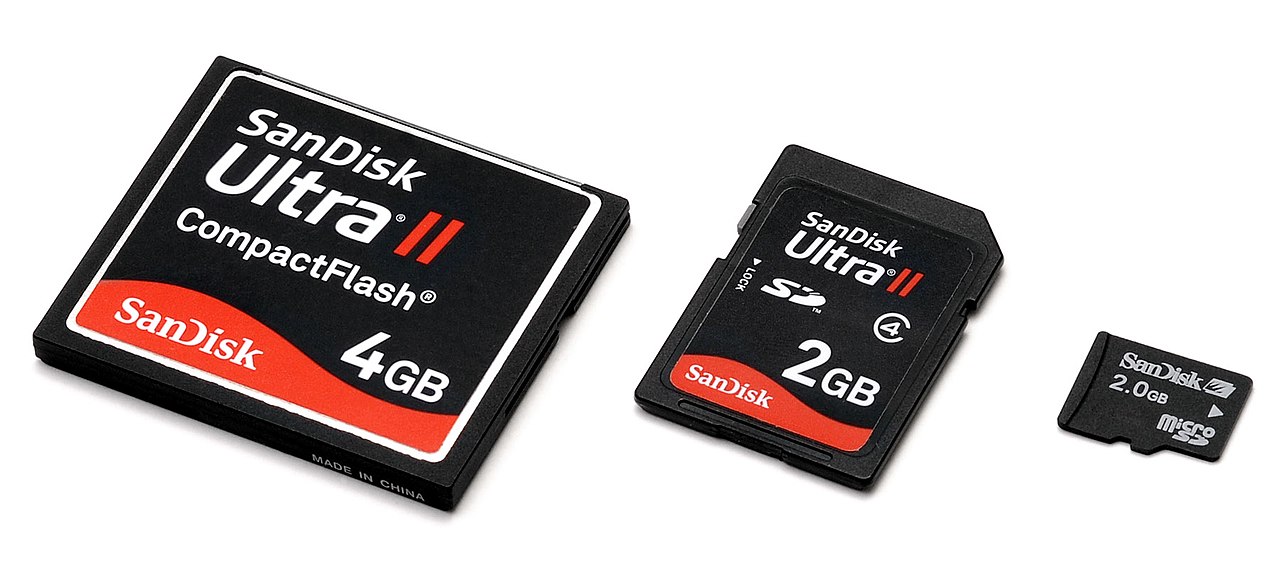
Understanding Card Formats
SD Cards (SDXC UHS-I and UHS-II)
SD cards are the most common format in photography. If your camera has a single card slot, it's almost certainly SD. The format has evolved significantly:
UHS-I cards max out at about 104 MB/s. These are fine for casual shooting, but they'll bottleneck burst shooting on any modern mirrorless camera. You'll notice the buffer filling up and the camera slowing down during continuous shooting.
UHS-II cards push theoretical speeds up to 312 MB/s, with real-world write speeds of 200-280 MB/s for the fastest models. This is what you want for serious photography. The physical difference is visible: UHS-II cards have a second row of pins on the back.
CFexpress Type B
CFexpress Type B is the professional standard found in cameras like the Nikon Z8, Nikon Z9, Canon EOS R5 Mark II, and the Sony A1. These cards use a PCIe interface and are dramatically faster than SD.
CFexpress 2.0 Type B cards deliver around 1,700-2,000 MB/s read speeds. The newer CFexpress 4.0 generation, which is now mainstream in 2026, roughly doubles that bandwidth to 3,700-4,000 MB/s by moving to PCIe Gen4. Almost every CFexpress card sold today is 4.0, which is good news: the playing field has leveled and you can shop on price rather than worrying about generational differences.
CFexpress Type A
Sony uses CFexpress Type A, a smaller format that's physically closer in size to an SD card. It's found in cameras like the Sony A7R V and Sony A9 III. Type A uses a single PCIe lane (versus Type B's two), so maximum speeds are lower at around 800-1,000 MB/s for 2.0 cards and up to 1,800 MB/s for the newer 4.0 generation.
Type A cards are not interchangeable with Type B. Sony cameras with dual slots often pair a CFexpress Type A slot with an SD slot, and some Type A slots are backward compatible with SD cards.
Speed Ratings Decoded
Memory card packaging is covered in logos, numbers, and speed classes. Here's what actually matters for photographers:
V rating (Video Speed Class): This is the guaranteed minimum sustained write speed, which is the most important spec for both video and burst photography. V30 guarantees 30 MB/s, V60 guarantees 60 MB/s, and V90 guarantees 90 MB/s. For stills photography, V60 is adequate for most cameras. V90 is ideal for cameras shooting uncompressed RAW or 8K video.
UHS Speed Class (U1/U3): An older rating system. U3 guarantees 30 MB/s minimum write, roughly equivalent to V30. It tells you less than the V rating, so prioritize V class when comparing.
Maximum read/write speeds: The big numbers on the packaging (like "300 MB/s!") are peak read speeds under ideal conditions. Write speeds, which determine how fast your camera can clear its buffer, are always lower and rarely advertised as prominently. Look for cards that publish their write speeds, not just read speeds.
VPG400 (Video Performance Guarantee): Found on premium CFexpress cards, this guarantees 400 MB/s sustained write. Overkill for stills, but essential if you're shooting high-bitrate 8K video.
Best SD Cards for Photographers
Best Overall: SanDisk Extreme PRO UHS-II V90
The SanDisk Extreme PRO SDXC UHS-II V90 has been the go-to recommendation for years, and for good reason. It delivers up to 300 MB/s read and 260 MB/s write speeds, which is fast enough to keep up with virtually any camera's SD card slot. A 128GB card runs around $100-130.
SanDisk's reliability track record is excellent, and the card includes a limited lifetime warranty and a data recovery program. If you only buy one SD card, make it this one.
Best Value: Lexar Professional 2000x UHS-II V90
The Lexar Professional 2000x is a strong alternative with similar V90 speeds at a slightly lower price. It reads at up to 300 MB/s and writes at up to 260 MB/s. Lexar cards have improved significantly in reliability and now compete directly with SanDisk at every tier.
Budget Pick: SanDisk Extreme UHS-I V30
If your camera only has a UHS-I slot or you need cards in bulk for travel, the SanDisk Extreme is the best value option. With V30 speeds and a 128GB capacity for around $15-20, these are reliable everyday cards. Just don't expect them to keep up with high-speed burst shooting.
Best CFexpress Cards for Photographers
Best Overall: Delkin BLACK CFexpress 4.0 Type B
The Delkin BLACK CFexpress 4.0 Type B delivers write speeds up to 3,200 MB/s sustained and has earned a reputation for reliability among professional photographers. It meets VPG400 for video shooters. Available in capacities from 165GB to 2TB.
Best Value: Lexar Professional DIAMOND CFexpress 4.0 Type B
The Lexar Professional DIAMOND is another top-tier CFexpress 4.0 card with similar speeds to the Delkin at a competitive price. Both cards are VPG400 rated and perform nearly identically in real-world camera testing, so buy whichever is cheaper when you're ready to purchase.
Best CFexpress Type A: Sony TOUGH CFexpress Type A
For Sony shooters, the Sony TOUGH CFexpress Type A is the most reliable option. The newer 4.0 generation cards offer read speeds up to 1,800 MB/s and write speeds up to 1,650 MB/s. They're expensive per gigabyte, but Sony's TOUGH line has an excellent track record for durability.
How Much Storage Do You Need?
This depends on your shooting style, file format, and whether you shoot video.
A single uncompressed RAW file from a 45-megapixel camera like the Nikon Z8 is about 90-100 MB. On a 128GB card, that's roughly 1,200 images. For a day of general photography, that's plenty. For a multi-day trip or a wedding, you'll want 256GB or more, or multiple 128GB cards.
For 4K video at high bitrates, storage fills fast. Budget at least 256GB for a serious video session, and consider 512GB if you're shooting long events.
The case for multiple smaller cards over one large card: if a card fails or gets lost, you only lose part of your work, not all of it. Many working photographers carry three or four 128GB cards rather than a single 512GB card for exactly this reason.
Card Care and Best Practices
Your memory cards will last for years if you treat them well. A few habits make a real difference.
Format in-camera, not on your computer. Always format your cards using your camera's built-in format function. This ensures the file system is optimized for your specific camera. Computer formatting can cause compatibility issues.
Don't delete individual images on the card. Selectively deleting photos from a card can fragment the file system over time. Instead, import everything to your computer, verify the backup, and then format the card fresh.
Retire cards after heavy use. Memory cards don't last forever. If you're a professional shooting daily, consider rotating cards out every 2-3 years. For hobbyists, cards last much longer, but if you ever experience a read error, retire the card immediately.
Always carry spares. Cards are small and relatively cheap. Keep at least one spare in your bag at all times. A spare card has saved many photographers from missing an event.
Use ExifGrabber to check your files after a shoot. By examining the EXIF data, you can confirm that your card wrote files correctly and that no corruption occurred during the session.
Don't Forget the Card Reader
A fast card is pointless if your reader can't keep up. For SD UHS-II cards, you need a UHS-II capable reader. For CFexpress, look for a Thunderbolt or USB 3.2 Gen 2 reader. The SanDisk Extreme PRO card reader is a solid, affordable option for both SD and CFexpress.
The Bottom Line
For most photographers using SD cameras: get the SanDisk Extreme PRO UHS-II V90 in 128GB. It's fast, reliable, and fairly priced.
For CFexpress shooters: the Delkin BLACK 4.0 Type B or Lexar Professional DIAMOND are both excellent. Buy whichever has the better price when you're shopping.
Don't overthink capacity. Two 128GB cards beat one 256GB card for redundancy. And always, always carry a spare.